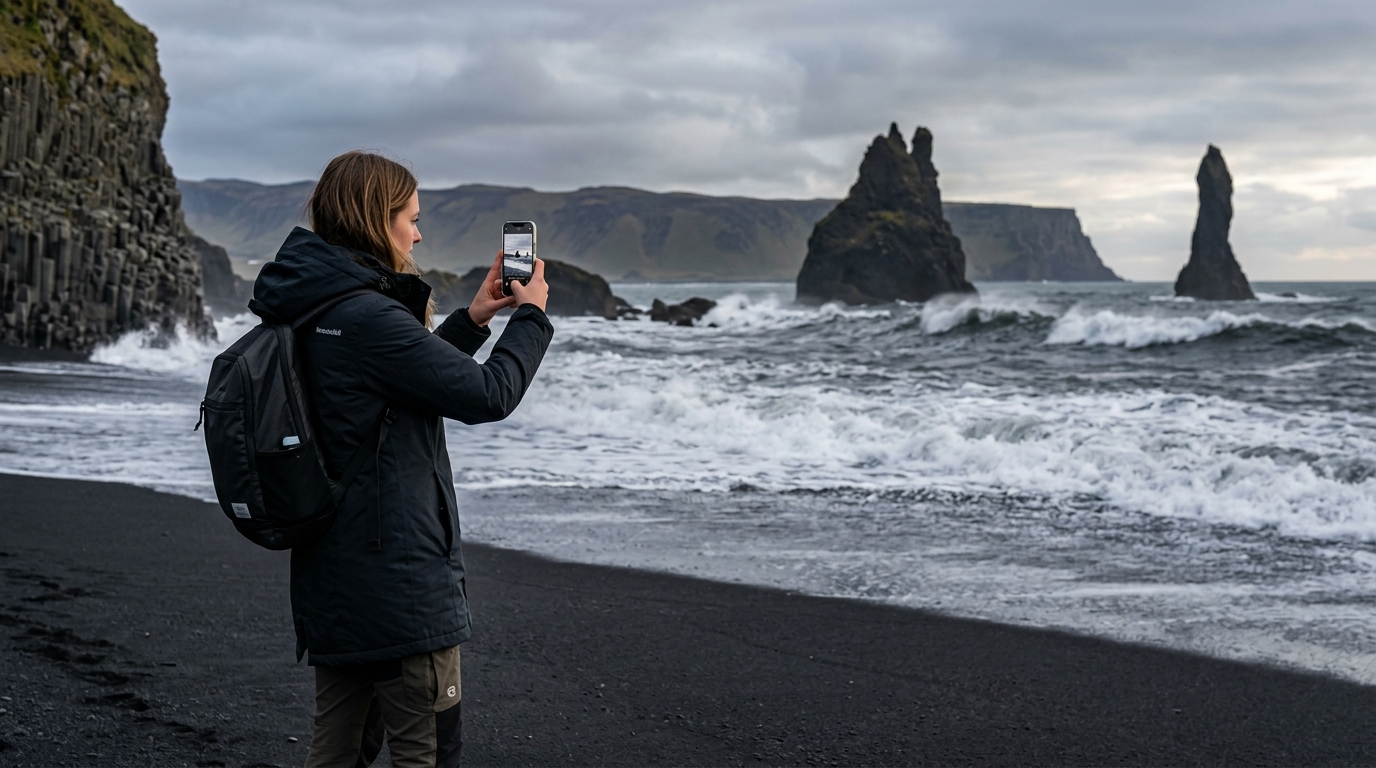
For years, capturing the raw, majestic beauty of the Land of Fire and Ice meant lugging a heavy DSLR, multiple bulky lenses, and a massive tripod across glaciers and lava fields. Today, advancements in computational photography and sensor technology mean that Iceland smartphone photography has become a highly respected medium. Modern mobile lenses are well suited for Iceland’s diverse landscapes, from the towering ice walls of Vatnajökull to the delicate, dancing ribbons of the auroras.
Whether you are standing at the edge of a roaring waterfall or waiting for the Northern Lights to appear on a freezing winter night, your pocket-sized device is capable of capturing print-worthy memories. However, achieving professional-level results requires an understanding of Iceland’s unique lighting conditions, unpredictable weather, and the technical limits of mobile sensors — most notably reach, which is why some photographers pair a phone with a compact zoom or bring a dedicated camera; see our guide to the best lenses for Iceland photography for that setup. With the right techniques and preparation, your smartphone can be an excellent tool for documenting your Icelandic adventure.
Essential Gear for Iceland Smartphone Photography
While the goal of shooting with a smartphone is to travel light, relying solely on a naked device in a sub-Arctic climate can lead to missed opportunities. To truly master Iceland smartphone photography, you need a few critical accessories designed to combat the elements.
High-Capacity Power Banks
Iceland’s cold weather is notoriously harsh on modern electronics. Lithium-ion batteries, which power virtually all smartphones, rely on chemical reactions that slow down significantly in freezing temperatures. This causes your battery percentage to drop rapidly. According to the Icelandic Meteorological Office, winter temperatures frequently hover around freezing, accompanied by relentless winds that drastically lower the "feels like" temperature. To prevent your phone from losing power right as a geyser erupts, it is highly recommended to carry a reliable power bank and consider keeping it stored in an inner jacket pocket close to your body heat. You can run a long charging cable from the power bank to your phone while you shoot.
Microfiber Cloths
Water is everywhere in Iceland. Between the constant mist generated by massive waterfalls, the frequent coastal drizzle, and unpredictable rain showers, your smartphone lens will frequently be covered in tiny water droplets. Even a single speck of water on a small smartphone lens can cause light blooming and reduce the sharpness of your photo. Pack several high-quality microfiber cloths in waterproof ziplock bags, and get into the habit of wiping your lens immediately before pressing the shutter.
Sturdy Smartphone Tripod
A tripod is necessary for capturing the Northern Lights and achieving long-exposure waterfall shots. Because Iceland is incredibly windy, flimsy, lightweight plastic tripods will vibrate, resulting in blurry images. Invest in a travel tripod with a robust smartphone mount, or a heavy-duty flexible tripod that you can wrap around sturdy guardrails or rocks to anchor your device against strong winds.
Touchscreen-Friendly Gloves
You cannot operate your smartphone camera effectively if your hands are numb. Taking your gloves off every time you want to adjust your exposure or switch lenses will quickly become uncomfortable. Invest in a pair of high-quality, windproof gloves with conductive threading in the fingertips. This allows you to maintain full camera control while protecting your hands from the freezing Arctic winds.
Best Smartphone Camera Settings Iceland Landscapes Demand
Relying on your phone’s default automatic settings will often yield flat, poorly exposed images in extreme environments. To capture the dramatic contrast of this country, you need to utilize the best smartphone camera settings Iceland photographers rely on daily.
Enable Grid Lines for Perfect Composition
Before you even step out of your rental car, dive into your camera settings and turn on the grid lines. This overlays a 3x3 grid on your screen, allowing you to easily apply the rule of thirds to vast horizons. In Iceland, you will frequently photograph expansive, flat landscapes meeting dramatic skies. Placing the horizon perfectly on the upper or lower third line—rather than cutting the image in half—creates a much more dynamic and visually pleasing photograph.
Shoot in ProRAW or RAW
Iceland is a land of extreme contrast. You will frequently find yourself photographing dark, textured basalt rock formations set against blindingly bright white snow or glacial ice. Standard JPEG or HEIC files compress image data, which can clip the bright highlights and crush the dark shadows. By shooting in ProRAW (available on iPhone Pro models) or RAW (available on most Android devices via Pro mode), you retain maximum sensor data. As highlighted by Apple’s guide on the benefits of shooting in ProRAW format, this uncompressed data is critical for recovering details in high-contrast landscape photography during the editing process.
Lock Focus and Manually Adjust Exposure
Smartphone cameras are programmed to expose for middle gray. When you point your phone at a landscape dominated by bright white snow or a massive glacier, the camera’s automatic metering system can get tricked. It often interprets the scene as too bright and automatically darkens the exposure, resulting in dull, gray snow. To fix this, tap and hold on your subject to lock the focus and exposure (AE/AF Lock). Then, manually drag the exposure slider up slightly to ensure the snow remains brilliantly white without blowing out the sky.
Turn Off Auto-Flash
It is generally best to avoid using your smartphone’s flash for landscape photography. In Iceland, where horizontal rain and snow are common, a flash will often only illuminate the precipitation immediately in front of your lens, creating bright, distracting white orbs that obscure the landscape entirely. Force the flash to the "Off" position in your settings.
How to Take Photos in Iceland with iPhone and Android: Composition Rules
Having the right settings is only half the battle. Knowing how to take photos in Iceland with iPhone or Android devices requires a keen eye for composition. The landscape is so vast that it can easily look flat and uninteresting on a small screen if not framed correctly.
Utilize Leading Lines
Iceland’s topography is filled with natural and man-made lines that can draw the viewer’s eye deep into your photograph. Look for the winding, yellow-staked Ring Road cutting through a snowy valley, the jagged edges of basalt columns, or the snaking path of a glacial river. Position your smartphone so these lines start at the bottom corners of your frame and converge toward your main subject, creating a powerful sense of depth.
Show Scale with a Human Element
It is difficult to convey the sheer, towering magnitude of a glacier or a canyon like Fjaðrárgljúfur without a point of reference. A massive cliff face can look like an ordinary rock on a smartphone screen unless there is something recognizable to compare it to. Place a person in your frame to establish scale. For the best results, have your subject wear a bright, contrasting color—like a classic yellow rain jacket or a vibrant red beanie. This pop of color stands out beautifully against the dominant blues, greens, and grays of the Icelandic wilderness.
Prioritize Foreground Interest
Because smartphone cameras feature ultra-wide lenses, they have a tendency to push the background far away, making distant mountains look small. To combat this, get your phone low to the ground and incorporate foreground interest. Use a cluster of purple Alaskan lupines, a jagged chunk of crystal-clear ice on Diamond Beach, or textured, moss-covered lava rocks in the immediate foreground. This technique grounds the image, adding three-dimensional depth to ultra-wide mobile shots.
Mastering Iceland Smartphone Photography in Challenging Weather
Icelandic weather changes by the minute. You will likely experience bright sunshine, dense fog, horizontal rain, and strong winds all in the same afternoon. Adapting to these conditions is what separates amateur snapshots from professional-grade mobile photography.
Protecting Your Phone from the Elements
While many modern flagship smartphones boast strong water and dust resistance ratings, they are not invincible. The wind in Iceland can whip up fine, abrasive volcanic dust that can scratch the protective glass over your camera lenses. When you aren't actively shooting, keep your phone securely zipped in a pocket. If you are shooting near the coast or during a storm, use your body to shield the phone from the brunt of the wind-driven rain.
Using Burst Mode for High Winds
During intense wind gusts, holding your phone perfectly still is incredibly difficult. This micro-jitter will cause motion blur in your photos. To increase your chances of a sharp image, utilize your phone’s burst mode. By holding down the shutter button (or sliding it to the left on an iPhone), you can capture multiple frames per second. Later, you can review the sequence in the warmth of your car and select the single sharpest frame where your hands were momentarily steady.
Embracing Moody Weather
Many travelers are disappointed when they wake up to overcast, gray skies. However, for photography, this is often ideal. A thick layer of clouds acts as a giant, natural softbox, diffusing the harsh rays of the sun. This provides even, shadowless lighting that is exceptionally flattering for deep canyons, moody black sand beaches, and intricate waterfalls. Embrace the fog and the gloom—it adds an authentic, dramatic atmosphere to your Icelandic portfolio.
Capturing the Northern Lights with Your Phone
Photographing the Aurora Borealis was once strictly the domain of professional camera gear. Today, capturing the Northern Lights with a smartphone is entirely possible, provided you follow a strict technical process.
The Mandatory Tripod
Capturing the faint light of the aurora requires the camera sensor to gather light over a sustained period. Even the slightest movement will cause the phone to shake, resulting in a blurry image. Mount your phone on a sturdy tripod before attempting night sky photography.
Dialing in the Right Exposure
For iPhone users, Apple’s computational photography makes this relatively straightforward. As detailed in Apple’s official documentation on maximizing Night mode, when your phone detects a completely dark environment and is stabilized on a tripod, Night Mode will automatically allow for extended exposure times. Manually slide the exposure time to the maximum limit.
For Android users, open your camera app’s Pro or Manual mode. Set a higher ISO and a longer shutter speed depending on the brightness of the aurora. If the lights are moving rapidly, a shorter exposure will capture the distinct pillars of light, whereas a longer exposure will blur them into a smooth, green cloud.
Focusing and Triggering the Shutter
Autofocus struggles in dark conditions. If your phone allows manual focus, slide the focal distance to "Infinity" (often represented by a mountain icon) to ensure the stars and the aurora are sharp. Finally, try to avoid tapping the shutter button with your finger, as the physical tap can introduce camera shake. Use a remote Bluetooth shutter, or simply set a short timer so the phone has time to stabilize after you press the button.
Photographing Iceland's Waterfalls and Black Sand Beaches
Water in motion is one of the most compelling subjects in Iceland. From the terrifying power of Dettifoss to the rhythmic crashing of the Atlantic against Reynisfjara, capturing water requires specific mobile techniques.
Creating the Silky Water Effect
You don't need neutral density filters and manual shutter calculations to get that ethereal, silky smooth water effect on a smartphone. On an iPhone, ensure "Live Photo" is turned on (the concentric circles icon) before you take the picture of the waterfall. After capturing the shot, open the photo in your gallery, tap the "Live" dropdown menu in the top left corner, and select "Long Exposure." The phone’s software will instantly blend the frames together, blurring the rushing water while keeping the surrounding rocks sharp.
For Android users, look for dedicated long-exposure modes (like Samsung’s "Expert RAW" or Google Pixel’s "Motion" mode). If your native app doesn't support this, third-party apps can easily replicate the effect.
Safety Warning at Black Sand Beaches
When photographing Iceland's most photogenic waterfalls and coastal areas, safety must be your top priority. At black sand beaches like Reynisfjara, the ocean produces deadly "sneaker waves"—massive, powerful waves that surge much further up the beach than regular waves, often without warning. When you are staring down at your smartphone screen trying to frame the perfect shot, you lose your peripheral vision and situational awareness. Never turn your back to the ocean, keep a safe distance from the surf, and establish your composition quickly.
Iceland Mobile Photography Tips: Editing on the Go
The final step in the photographic process is the edit. Because you are shooting in RAW, your initial images will look somewhat flat. The best Iceland mobile photography tips involve knowing how to process these files directly on your device.
Top Mobile Editing Apps
Download Adobe Lightroom Mobile and Snapseed before your trip. Both offer powerful editing tools right on your phone. Lightroom is excellent for managing RAW files and performing precise color grading, while Snapseed offers incredible selective adjustment tools for dodging and burning specific areas of your landscape.
Correcting White Balance
One of the most common issues with winter photography in Iceland is an overwhelming blue tint. Snow reflects the ambient light of the sky, and in the shade or during twilight, your phone’s auto white balance will often render the snow as a heavy, unnatural blue. In your editing app, gently slide the temperature slider toward the "warm" (yellow) side until the snow returns to a natural, crisp white.
Enhancing Greens and Blues
Iceland’s color palette is defined by the vibrant green of its volcanic moss and the deep cyan of its glacial ice. To make these elements pop without making the photo look artificial, avoid the global "Saturation" slider. Instead, use the HSL (Hue, Saturation, Luminance) tool in Lightroom. Selectively target the blue and green channels, slightly increasing their saturation and luminance. This will make the mossy canyons and ice caves look spectacular while keeping the rest of the landscape grounded in reality.
Frequently Asked Questions
Can I take good pictures of the Northern Lights with an iPhone?
Yes, absolutely. Recent iPhone models feature a dedicated Night Mode that is highly capable of capturing the Northern Lights. The key to success is keeping the phone perfectly still. You must mount the iPhone on a tripod. Once stabilized in a dark environment, the camera will automatically allow for an extended exposure time, which helps capture the vibrant greens and purples of the aurora.
How do I keep my phone battery from dying in Iceland's cold?
Cold temperatures degrade lithium-ion battery performance, causing rapid power drains. To help prevent this, keep your phone in an internal pocket close to your body heat when you aren't actively taking photos. Additionally, it is highly recommended to carry a reliable power bank and consider keeping it plugged into your phone while shooting outdoors. Using a thermal phone pouch can also provide an extra layer of insulation against the freezing wind.
Do I need a waterproof phone case for Iceland?
While many modern smartphones have strong water resistance ratings (meaning they can withstand splashes and brief submersion), a dedicated waterproof case is still highly recommended. Iceland's waterfalls generate massive amounts of soaking mist, and rainstorms can be intensely driven by high winds. A waterproof case not only adds an extra layer of moisture protection but also shields your device from highly abrasive volcanic dust and black sand.
How do I get the silky water effect on my phone camera?
On an iPhone, turn on the "Live Photo" feature before taking a picture of a waterfall or river. Keep your hands as steady as possible (or use a tripod). Afterward, open the photo, tap the "Live" button in the top left, and choose the "Long Exposure" effect. The software will blend the motion into a silky blur. On an Android device, you can use built-in features like Pixel's "Motion Mode," Samsung's Pro mode with a slow shutter speed, or third-party camera apps designed for long exposures.
Conclusion
Mastering smartphone photography in Iceland proves that capturing breathtaking landscape imagery is no longer solely dependent on heavy professional camera gear. By understanding the unique environmental challenges of the sub-Arctic, utilizing the advanced settings hidden within your mobile device, and applying fundamental rules of composition, you can return home with a spectacular portfolio of images. Remember that great photography is fundamentally about preparation, patience, and technique.
Ready to test your smartphone skills? Explore our interactive Iceland Photo Map to discover the exact coordinates of the country's most photogenic locations!