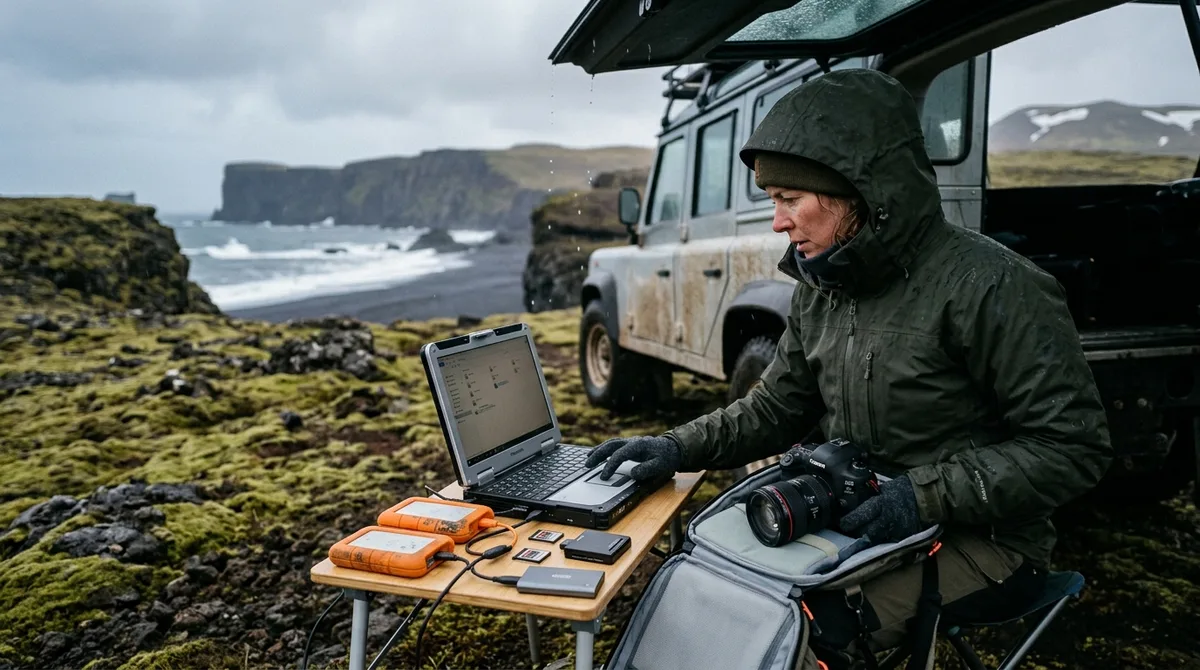
A bulletproof system for Iceland photography file management requires a strict 3-2-1 field backup protocol, ruggedized IP67 solid-state storage, and rigorous thermal acclimation before drive spin-up. By separating primary working SSDs from clone drives and leaving camera memory cards unformatted until safely home, you insulate your expedition archives against sub-zero component failures, vehicle electrical spikes, and catastrophic data corruption.
Every landscape photographer heading to the North Atlantic anticipates dramatic light, but few adequately prepare for the brutal toll Iceland extracts on digital hardware. Operating in conditions that combine gale-force salt spray, airborne basalt dust, geothermal sulfur emissions, and extreme temperature fluctuations means standard travel backup habits will fail. When you are shooting thousands of high-resolution RAW frames across changing weather systems, data management is just as critical as composition and exposure.
Why Iceland Photography File Management Demands a Rugged Protocol
Field data integrity faces unique physical threats across the Icelandic landscape. Sub-polar maritime weather creates rapid shifts in humidity and ambient temperature. Stepping out of a heated camper van into a sub-zero squall along the South Coast exposes electronic contacts to flash condensation, which causes pin bridging, controller short-circuits, and drive mount failures. Furthermore, airborne tephra and microscopic basalt grit blown across outwash plains like Skeiðarársandur can easily work their way into exposed USB-C ports, card reader pins, and cooling vents.
Simultaneously, field storage demands escalate much faster than on conventional landscape trips. Capturing dynamic scenes—such as churning cascade plumes at major waterfalls or volatile auroral displays—forces high data throughput:
- Multi-frame exposure bracketing: Dynamic ranges at sites like Skógafoss or Aldeyjarfoss often span 14+ stops, demanding 3- to 5-shot bracket sequences per composition.
- Aurora timelapses: Capturing continuous nocturnal intervals often generates 800 to 1,500 uncompressed 14-bit or 16-bit RAW frames in a single night.
- High-speed wildlife bursts: Tracking puffins in flight against coastal updrafts at 20 to 30 frames per second on 45MP to 61MP sensors rapidly consumes 128GB to 256GB cards within hours.
The most devastating data losses rarely stem from damaged camera sensors; they happen during late-night transfers when physical and mental exhaustion set in. Running power inverters off draining camper van auxiliary batteries can trigger mid-transfer voltage sags that corrupt memory card file allocation tables. Without an automated, checksum-verified ingestion and storage protocol, accidental file deletions and failed transfers are inevitable.
Field Hardware Selection: Rugged Drives, Hubs, and Ingest Readers
Your field storage chain is only as dependable as its weakest physical link. Traditional mechanical hard disk drives (HDDs) have no place on an Icelandic expedition; vehicle vibrations on corrugated gravel F-roads can cause head crashes, and freezing spindle lubricants will seize drive motors. High-speed solid-state storage is mandatory, but drive specs require careful vetting.
Prioritize external NVMe drives with certified IP67 ingress protection, such as the SanDisk Professional PRO-BLADE, Samsung T7 Shield, or ruggedized OWC Envoy enclosures. An IP67 rating ensures total protection against microscopic volcanic dust and up to 30 minutes of water immersion at a one-meter depth. Ensure your primary drive uses a ruggedized elastomer sleeve that absorbs shock from accidental drops onto basalt rock.
Camera card configuration provides your absolute first line of defense. often configure dual-card cameras to Backup/Mirror mode rather than Overflow . Writing identical RAW files simultaneously to Slot 1 (CFexpress Type B or Type A) and Slot 2 (UHS-II SD) guarantees an instant hardware fallback if a single card controller suffers a fatal write error mid-exposure.
For ingest card readers, select dedicated, bus-powered metal units with short, heavy-gauge cables. High-draw multi-port USB hubs often fail when running off laptops operating on battery power in freezing temperatures. Additionally, modern high-speed cards—specifically CFexpress Type B units—generate significant internal heat during 1,000MB/s+ ingestion bursts. Ensure your card reader features an aluminum heatsink body to dissipate thermal load into the surrounding air and avoid thermal throttling or pin damage.
Executing a Bulletproof Backup Strategy for Travel Photography in Remote Areas
The gold standard of digital preservation is the 3-2-1 backup model: three copies of your data, across two different media types, with one copy stored off-site. Maintaining this standard off-grid in remote highlands or along the Westfjords requires tactical field adjustments.
A reliable backup strategy for travel photography in off-grid environments adapts the 3-2-1 framework into a self-contained, closed-loop triad that operates entirely without internet access:
- Primary Working Drive (Copy 1): A fast, bus-powered external NVMe SSD where files are ingested, organized, and culled daily.
- Clone Mirror Drive (Copy 2): An identical, secondary external SSD to which the primary drive is cloned each evening via bit-for-bit checksum verification.
- Untouched In-Camera Cards (Copy 3): Your original memory cards, which serve as read-only physical cold storage. Once a card is full, toggle its physical write-protect lock switch and pack it away. rarely format a card in the field.
Mitigating physical risk requires strict separation protocols. If a river crossing floods your vehicle or a daypack is lost on a mountain pass, you cannot afford to lose all redundant copies in a single incident. Keep your Primary Working Drive inside your carry-on daypack, which stays with you at all times. Store your Clone Mirror Drive inside an airtight, shockproof hard case (such as a Pelican or Nanuk) stowed securely in the vehicle’s main cargo hold. Keep your locked, full memory cards in a water-resistant, anti-static card wallet tucked into a zipped inner pocket of your parka.
Standardized Folder Structures for Organizing RAW Files on the Road
Rigorous cataloging in the field eliminates hours of chaotic triage when you return to the studio. Establishing a systematic, machine-readable directory hierarchy allows you to locate specific frames instantly without opening memory-hungry catalog management software on underpowered field laptops.
Avoid generic folder titles like "Day 1" or "Iceland Waterfalls." Instead, use an ISO 8601 standardized date structure that sorts alphanumerically, combined with regional descriptors and individual camera body tags:
/2026_Iceland_Archive/
  ├── 20260906_SouthCoast_Skogafoss/
  │   ├── RAW_A7R5_CardA/
  │   ├── RAW_A7R5_CardB/
  │   └── Tracklogs/
  ├── 20260907_Highlands_Landmannalaugar/
  │   ├── RAW_A7R5_CardA/
  │   └── DNG_Mavic3_Drone/
  └── Catalogs_Sessions/
      └── Mobile_Field_Project.xmp
When organizing raw files, maintaining strict separation between camera cards preserves the capture sequence and simplifies differential syncs. If you record high-precision spatial tracks using handheld GPS units or watch-based trackloggers, immediately copy daily .GPX or .KML files into the corresponding shoot directory. The KML, GPX and GeoJSON files live on your device, so the waypoints work with no signal. Downloading offline map tiles is a separate step inside your mapping app. When matching your field photos to offline waypoints imported via Gaia GPS waypoint import guides, having matching folder timestamps simplifies batch geotagging against your actual route.
often preserve proprietary sidecar files ( .XMP ) alongside RAW binaries in the same subfolder. If you apply metadata flags, color ratings, or optical lens corrections in mobile post-processing apps, sidecar synchronization ensures that this work transfers seamlessly to your desktop workstation without locking your edits into an isolated, device-specific mobile catalog database.
Culling Photos on the Road: Fast Triage Strategies Between Shoots
Attempting to run a desktop-class editing workflow from a camper van table after a grueling 12-hour shoot will drain your vehicle's batteries and your personal energy. Field post-processing should focus strictly on triage: rapid verification, quality control, and selective culling.
Desktop software like Lightroom Classic or Capture One can slow to a crawl on mobile machines when forced to build proprietary RAW previews for thousands of 60-megapixel files. Instead, use ultra-lightweight ingest viewers such as Camera Bits Photo Mechanic or FastRawViewer. These utilities decode the embedded, full-resolution JPEG preview already baked into your camera's RAW file structure by the image processor, allowing near-instantaneous browsing at many zoom with zero caching latency.
When culling photos on the road, enforce a strict, repeatable 3-tier rating system:
- Keep (Pick / Tag 1): Sharp focus, optimal exposure, and free from optical flaws. These form your expedition master collection.
- Maybe (Tag 2): Strong compositions that require secondary evaluation on calibrated studio monitors, or individual bracket frames destined for exposure blends and focus stacks.
- Reject (Mark for Deletion / Tag 3): Soft frames, accidental ground shots, and sequences ruined by spray droplets on the front element.
Iceland's pervasive moisture makes optical quality control a top priority. Inspect wide-angle frames captured near plunging water for faint lens-spray flares. Microscopic mist droplets settle on front elements within seconds at locations like Seljalandsfoss, appearing as low-contrast blurred spheres in high-aperture sky quadrants. Flagging these defects during evening triage allows you to reshoot the location if your itinerary permits, rather than discovering unfixable optical flaws after returning home.
Limit triage sessions to structured 30-minute intervals before retiring for the night. Set a timer, complete your ingestion and checksum verification first, cull the day's selects, and close the machine. Conserving sleep is vital for staying sharp through multi-day shoots under punishing sub-polar conditions.
Power Management and Thermal Care for Drives in Sub-Zero Icelandic Conditions
Data drives are vulnerable to rapid temperature shifts. Condensation physics and sub-polar environments present unique operating challenges that require careful thermal management.
When solid-state drives, card readers, or laptops sit in an unheated vehicle or backpack at sub-zero temperatures, the metallic enclosures cool below the ambient dew point. Bringing that freezing drive directly into a warm, humid environment—such as a heated camper cabin or hotel room—causes moisture to condense inside USB-C housing ports and on circuit boards. Powering up a drive covered in condensation can short-circuit the internal flash memory controller, bricking the unit instantly.
often store your storage drives in heavy-duty, airtight zip-top bags before bringing them indoors. Allow the drive to slowly acclimate to room temperature inside the sealed bag for at least 30 to 45 minutes before plugging it in. The bag traps the cold, dry air around the electronics, forcing condensation to form on the exterior plastic rather than across your high-speed circuit boards.
| Drive Architecture | Cold Shock Resilience | Power Draw | Field Suitability |
|---|---|---|---|
| Rugged NVMe SSD (IP67) | Excellent (Solid-state, sealed silicon) | Moderate (4.5W - 8W peak bus draw) | Optimal primary & clone mirror drive |
| Standard Portable SSD | Moderate (Vulnerable port housings) | Low to Moderate (3W - 5W) | Secondary clone only; keep dry |
| Mechanical HDD | Extremely Poor (Bearing seizure, head crash) | High spin-up spikes (Up to 10W) | Unsuitable for mobile expedition travel |
Vehicle electrical systems introduce another failure point. Modern camper van conversions often rely on modified sine wave inverters to convert 12V auxiliary DC into 230V AC wall power. These inverters generate electrical noise and harmonic distortion that can stress laptop power supplies, causing voltage spikes that propagate through USB-C rails into connected external SSDs. To prevent data corruption, invest in a pure sine wave portable power station (such as an EcoFlow or Jackery unit) that charges from your vehicle's 12V DC auxiliary port while providing clean, regulated power to your laptop and hard drive array.
Scaling Your Iceland Photography File Management Routine for Multi-Week Treks
A prolonged expedition—such as an extensive journey following a 10-day Iceland photography itinerary—generates significant data volume. Planning storage requirements in advance prevents workflow bottlenecks mid-trip.
Calculate your daily data footprint based on camera sensor resolution and anticipated shooting volume:
- High-Resolution Bodies (45MP - 61MP): Uncompressed 14-bit RAW files range from 60MB to 120MB per frame.
- Bracket Multipliers: An active shoot yielding 400 compositions with 3-shot brackets generates 1,200 RAW files, or approximately 100GB to 140GB per day.
- Drone & Video Overheads: Adding 10-bit 4K or 5.1K ProRes / D-Log aerial video quickly tacks on another 64GB to 128GB per flight session.
For a two-week expedition, plan for a baseline of 2TB to 4TB of raw file generation. To maintain the 3-2-1 backup model, deploy two separate 4TB rugged external SSDs alongside an adequate supply of primary camera memory cards.
To prevent accidentally overwriting full cards during rapid-fire shoots, use a physical color-coding system. Attach strips of red gaffer tape to the back of empty, formatted cards before leaving home. Once a card is filled and extracted from the camera body, peel the red tape off to expose the underlying label, engage the physical write-protect switch, and place it upside down in your waterproof Pelican case. rarely return a card to your primary active pouch until it has returned home and cleared final archive verification.
When working with hybrid media, integrate drone aerial footage and action-cam time-lapses directly into your daily folder hierarchy during ingestion. Store high-bitrate video clips in a dedicated /Video/ subfolder within that day's shoot directory. This keeps your still photos and motion assets unified under a single date-and-location timestamp, streamlining multi-camera editing later on.
Returning Home: Seamless Ingestion into Your Permanent Archive
The field data routine ends only when your images are safely stored in your permanent home archive. Avoid dragging and dropping folders through desktop operating system file managers. Standard OS copy commands do not verify whether individual bits were accurately written to the destination disk, leaving your files susceptible to silent bit rot and data dropouts.
Use checksum-verified transfer software such as ShotPut Pro, Silverstack, or run a terminal-based command using open-source utilities like rsync to copy data from your expedition SSDs to your central network-attached storage (NAS) or RAID array. A robust rsync command verifies file sizes and checksums across destination paths:
rsync -avh --checksum --progress /Volumes/Iceland_Field_Drive/ /Volumes/Studio_Master_Archive/2026_Iceland/
Once data ingestion is complete, import your standardized field folders into your central Lightroom Classic catalog or Capture One session library. Because you kept .XMP sidecar files unified in each subfolder throughout your travels, all field star ratings, color tags, and lens corrections will link automatically to your master collection without missing file paths.
Only after your primary home archive is fully written and an off-site cloud mirror (such as Backblaze B2 or a secondary off-site drive) has verified the new assets should you clear your field storage media. Format your camera cards in-camera—rarely on a computer—to allow the camera’s internal processor to create fresh, native file allocation tables before your next shoot.
Frequently Asked Questions
Should I format SD cards in Iceland once they are backed up to an external SSD?
No. rarely format memory cards while in the field. Original camera cards serve as the critical third tier of your 3-2-1 backup strategy (read-only cold storage). Cards should remain unformatted and physically write-locked inside a waterproof case until you have returned home and verified that your files exist on your master studio storage and a secondary cloud backup.
How do I manage high-volume RAW storage if I am traveling without a laptop?
If traveling without a computer, use an iPad Pro or high-end Android tablet equipped with a high-throughput USB-C port, connected to an external bus-powered hub that links your card reader and external SSD simultaneously. Alternatively, deploy dedicated, standalone direct-ingest field drives (such as legacy WD My Passport Wireless SSDs or Clikfree backup hubs) that feature integrated card slots and autonomous, one-touch copy operations that run without host devices.
Does cold weather in Iceland permanently damage portable SSD drives?
Solid-state drives withstand extreme cold much better than mechanical drives because they lack moving parts, but operating them below freezing poses real risks. Sub-zero temperatures can cause performance throttling in flash controllers, while thermal shock produces internal condensation when cold drives are brought into warm vehicles. often allow drives to acclimate to room temperature inside sealed plastic bags before connecting them to power.
Can I rely on cloud backup solutions like Dropbox or Google Photos while traveling along the Ring Road?
No. While cell coverage along Iceland's main Route 1 is generally good for messaging and GPS, mobile bandwidth—especially in remote fjords, mountainous areas, and highland tracks—is inadequate for uploading hundreds of gigabytes of uncompressed RAW files. Cloud backups should serve strictly as a secondary off-site fail-safe once you return home to high-speed broadband, not as an active line of defense during the trip.
The files carry season and access notes, not live conditions. Check vedur.is and road.is for current weather and road status before heading into remote territory.
Eliminate scouting guesswork while keeping your gear and workflow organized. Download the curated waypoint files from Iceland Photo Map to load coordinates directly into your preferred offline navigation app.